Practice plans
Practice plan builder
Drag drills onto a timeline and watch the time add up as you go. Share the plan before you get to the field.
 Ulti-MateSign inGet started free
Build a practice plan in a few minutes, post it with the schedule, and let players RSVP on their own. No more chasing the group chat at 11pm.
No credit card · Free for personal use
Name it, pick your division, and your team workspace is live. First 3 months free, no card required.
Invite players, coaches, and fans by email. Paste your list straight from a spreadsheet.
Post practices and games. Players RSVP on their own, so you always know who's coming.
Practice plans
Drag drills onto a timeline and watch the time add up as you go. Share the plan before you get to the field.
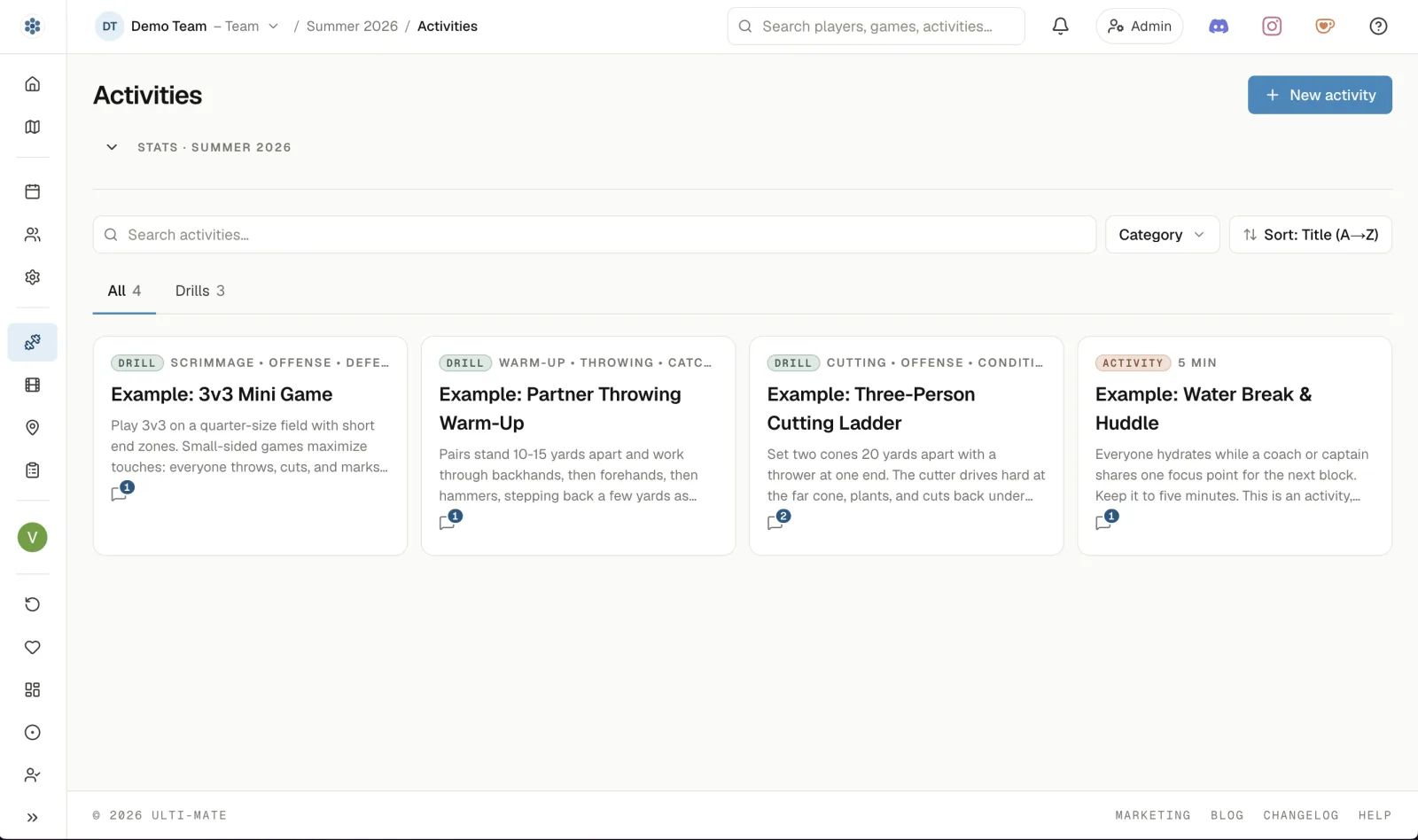
Drills
Save every drill once with its setup, coaching points, and timing, then drop it into any practice plan.
Film
Link game film, mark the moments that matter, and break it down together with comments right on the timeline.
Events
Practices, games, and tournaments on one schedule. Players RSVP on their own, and one roster follows each event from who was invited through to who actually turned up.
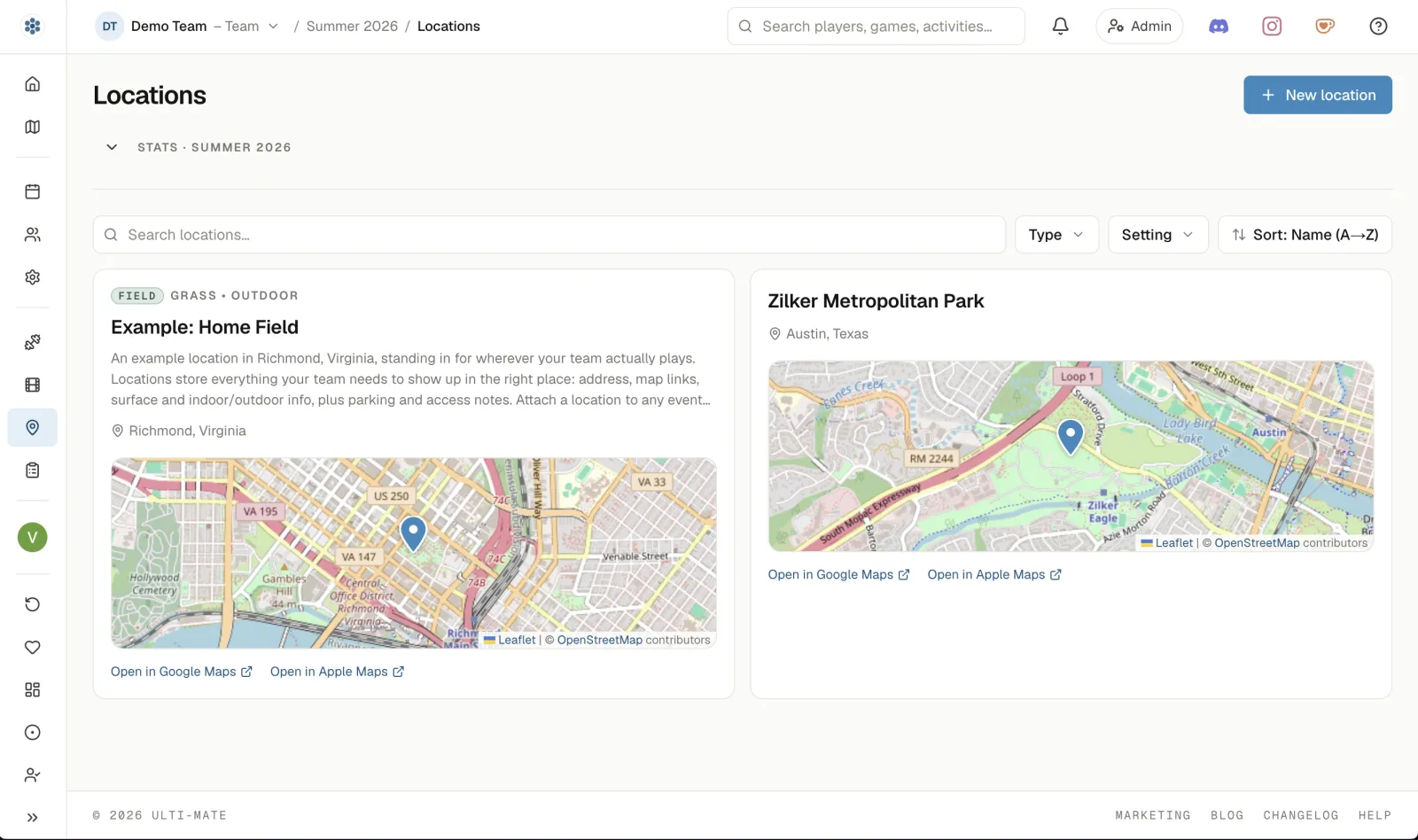
Locations
Save each field once with its address, map pin, and parking notes, then attach it to any event so directions are one tap away - and the forecast for that field lands on the event 6 days out, with a heat precaution level read against USA Ultimate's guidelines when the afternoon calls for one (US-only).
Personal is free forever. For a team, one person pays, and every player you invite joins free.
Build for yourself. No card, no time limit.
Start freeThe same Team plan, priced for schools, youth programs, and coaching programs.
Set up your teamEverything in Free, for your whole team.
Set up your team| Feature | FreeJust you | TeamYour whole roster |
|---|---|---|
| Library | ||
| Practice plans with the timeline builder | Included | Included |
| Reusable drill library | Included | Included |
| Import drills from a link or a PDFBETA | Included | Included |
| Film library and timeline edits | Included | Included |
| Comments and reactions | Included | Included |
| Share a link, a QR code, or a printed plan | Included | Included |
| Share and collaborate with the whole roster | Not included | Included |
| Schedule and events | ||
| Practices, games, and tournaments | Included | Included |
| Locations and maps | Included | Included |
| 6-day weather forecast at every field (US-only) | Included | Included |
| Online and hybrid events with a meeting link | Included | Included |
| Add any event to your calendar | Included | Included |
| RSVP and track your own attendance | Included | Included |
| RSVPs and attendance for the whole roster | Not included | Included |
| Turnout broken down by team role and matching player | Not included | Included |
| Roster and collaboration | ||
| Invite players, coaches, staff, and admins | Not included | Included |
| Moderate comments and reactions | Not included | Included |
Still stuck? Talk to a human →
The operating system for ultimate frisbee teams. Practice plans, a drill library, film, schedule, roster, and attendance in one workspace, instead of five spreadsheets and three group chats.
Captains and coaches first - the people who actually carry the team. Players get the schedule, RSVPs, and published practice plans; parents and fans can follow along.
Personal use is free forever: build practice plans, drills, and film edits for yourself, no card. The Team plan is a paid monthly subscription that opens the workspace up to your whole roster, priced flat per team with a lower rate for college, high school, youth, and coach-development programs. Your first 3 months are free. See plans for pricing and what each includes.
No - only one person pays for the Team plan. Whoever sets the team up covers the whole roster at one flat monthly price, and every player, coach, and admin they invite joins free. There are no per-player fees.
A few minutes. Name your team and pick a division - the workspace is live right away. Then invite your roster by email and post your first practice; see how it works for the whole path.
Admins invite the roster by email - paste your list straight from a spreadsheet and everyone gets an invite at once. Teammates accept, land on the roster, and immediately see the schedule and published plans.
Ulti-Mate is a web app that installs to your phone's home screen - open the site on your phone and it offers to install, or there's a row in Preferences. Installed, it opens on its own without the browser's chrome around it. There's nothing to download from an app store, and nothing for your players to install before they can RSVP.
No. Paste in a link to a page of drills, or hand it a PDF - typed or scanned - and Ulti-Mate reads them out one at a time for you to check and edit before any of them land in your library. Nothing saves until you say so. It's in beta and each team gets a set number of imports while it is.
Yes. Every plan prints or saves as a PDF, with the team and the plan named on it and the plan's comments at the foot - so "bring the extra discs" makes it to the field even when the phone doesn't. Every event, plan, location, and film also has a share link and a QR code for handing it to someone standing in front of you.
Yes, everywhere - the only US-only piece is the weather forecast, which comes from the National Weather Service. Everything else works the same anywhere: events carry their venue's timezone and read on your own clock, and temperature and wind can be shown in °C and km/h.
Yes. One roster follows an event the whole way - who was invited, who answered, and who actually turned up - and its heading changes as the event does. It breaks down by team role, so you can see at a glance that eight of your eleven players are in and both coaches are out, and on a mixed team it breaks down by matching player as well. Everyone invited can read the turnout; who was marked absent stays between that player and team leadership.
Yes. Every event at a saved field carries the forecast for that field, from 6 days out until it starts - temperature, wind, and the chance of rain hour by hour, plus any official weather alerts. Once the event is over the card freezes, so the season archive says what the conditions actually were. It's US-only today: the forecast comes from the National Weather Service.
Yes. Every event's forecast carries a heat precaution level read against USA Ultimate's published guidelines - wet bulb globe temperature where the National Weather Service models it, and the NOAA heat index everywhere else. When an afternoon reaches a level worth acting on, the event says what the guideline asks for: hydration breaks, a shorter cap, or rescheduling for cooler conditions. The call is still yours to make; we put the number in front of you. Read the guidelines.
No. Sign in and your free personal workspace is ready - build your drill library, draft practice plans, and schedule for yourself. Set up your team whenever you're ready to bring everyone in - the "Just for you" path shows how.
Nothing is deleted, ever. The team becomes inactive and read-only - your plans, drills, film, and roster stay viewable by everyone, and changes pause until you reactivate the Team plan.
Every team you set up gets its first 3 months on the Team plan free, no card required - your first team and any team after it. If you don't continue, nothing is deleted; the team just becomes inactive until you reactivate.
College, high school, middle school, youth club, and junior national/Worlds programs, plus coach-development programs - the same Team plan at a reduced rate.
Free to start. One person pays for the team, and everyone else joins free.